How to Upgrade to Version 5.0
If you’re ready to begin, please follow the steps below to download Abel Administrator Version 5.0. You can complete the process independently, or if you’d like guided support, simply reply to this email with your availability. You may also call Abel Screening Technical Support at 404-874-4772, Ext. 2, Monday – Friday from 9am to 7pm ET.
Preparing for the Download
We strongly recommend using Google Chrome for the download. If you are unable to use Chrome, you may need to bypass additional security prompts.
Step 1: Uninstall Version 4.2 and Remove ASI Documents
(If you have never installed Abel Administrator before, skip to Step 2.)
This step needs to be completed before installation of Version 5.0 to avoid duplication of files.
-
Uninstalling Version 4.2
i. In the Search Window type “Add or Remove Programs”
ii. Select “Apps” and locate the “ASI Administrator 2010”
iii. Click the three dots to the right and then select Uninstall
-
Removing ASI Documents Folder
i. Open Windows File Explorer.
ii. Copy and paste the following into the center address bar, then press Enter: C:/ProgramData/ASI
iii. Locate the folder titled ASI Documents.
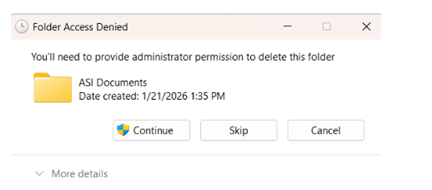
IV. Right‑click the folder and select Delete. Confirm when prompted.
(Administrator permissions will be required.)
If you encounter any issues, call Technical Support at 404‑874‑4772, Ext. 2, Monday – Friday from 9am to 7pm ET.
Step 2: Download and Install Version 5.0
Click the link below to download and install the Abel Administrator v5.0:
https://www.abelscreening.com/abelware/AASISetup.exe
Select Run to begin installation.
Step 3. IMPORTANT -- Confirm Installation
-
After installation, email us at asisupport@abelscreening.com to confirm that Version 5.0 has been successfully installed. We will then activate your account so there is no delay in receiving assessment results.
Next Steps: Complete Your Certification Exam(s)
We noticed that the only remaining step for you to receive your product key is completing the required certification exam(s). The instructions for taking exam(s) can be found in your original “Welcome to Abel Screening” email. If you need this information sent again, just let us know and we will happily provide it.
Once you receive your product key and begin using the application, our support continues. We're here to help you successfully implement the Abel Assessment tools and market your ability to offer scientifically valid assessments in your practice.
We look forward to supporting your work and contributing to the continued growth of your practice.